Arrived, outstanding, submitted
One screen per client and per year, showing what has come in, what is still missing, and what has been signed off, so nobody hunts for attachments in a thread.
Case study
The brief
To prepare a return, an accountant needs a specific set of things from each client: bank statements, credit card statements, government slips, invoices, and answers to a long list of questions about their situation.
Collecting that by email gives no shared definition of a complete file, no single place the documents live, and no view of who has submitted what. The firms asked for one place to request all of it, and one place to see what had come back.
How we framed it
Ask for the whole file once, in a structure the client can work through, and let the system do the chasing.
What the client sees
Each client logs into their own space, organised by year. Nothing starts from a blank message, because the portal already knows what the firm needs.
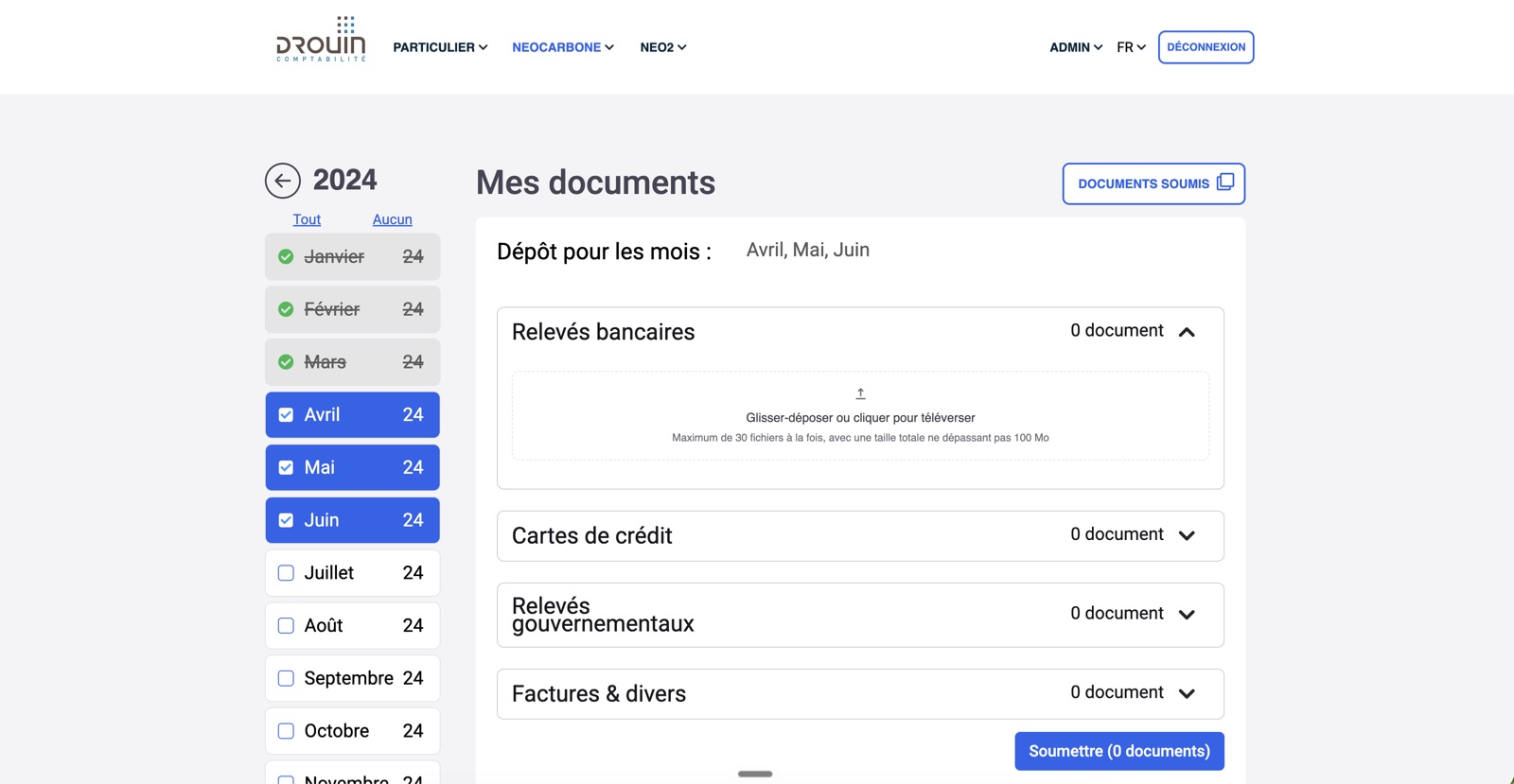
The client picks the months they are submitting for, then drops files into the category each one belongs to. Months already handed in are struck through, so it is obvious what is left.
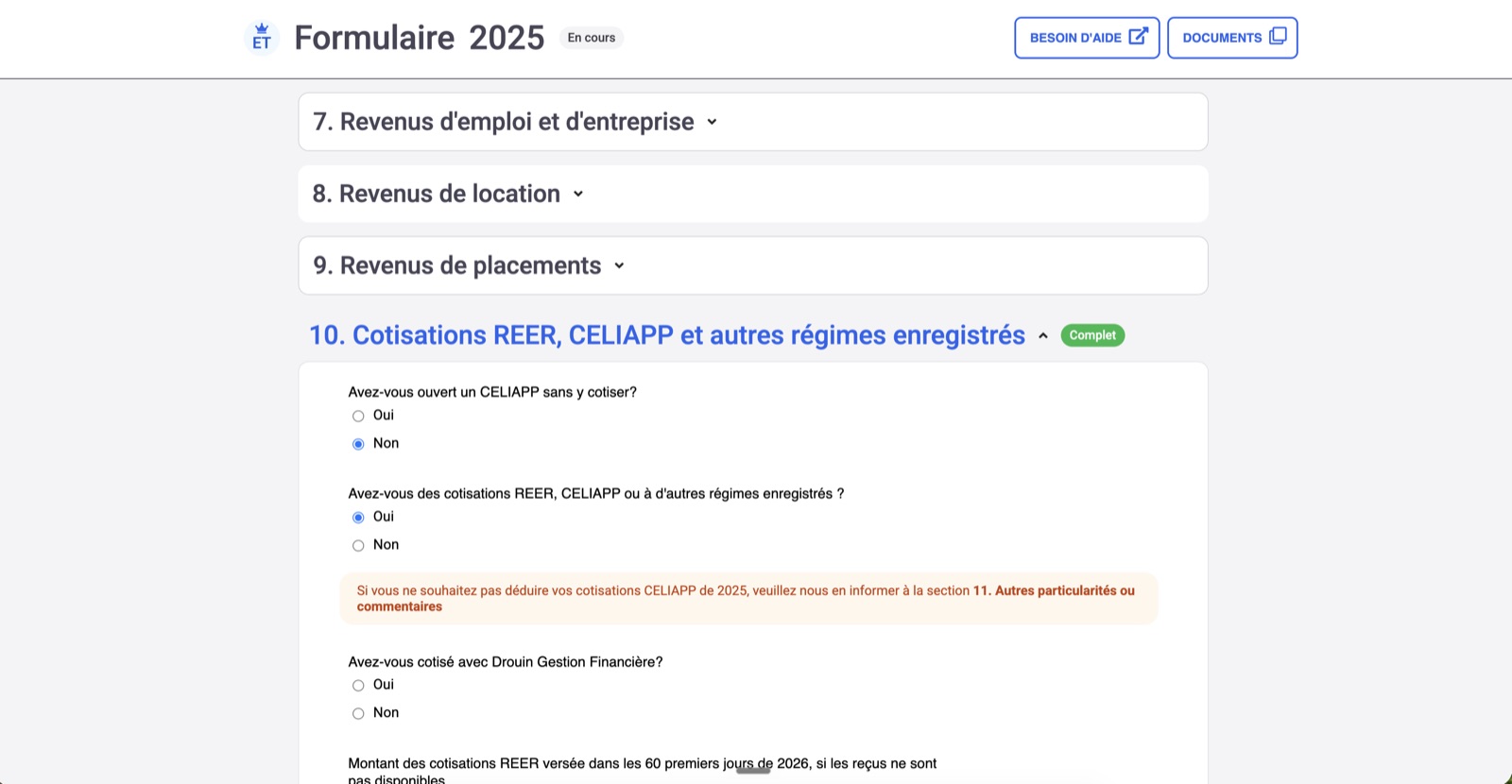
Instead of an emailed list of questions, the client works through a form built around Québec's own categories. Each section tracks its own state, so both sides can see how far along the file is.
What the accountant gets
The goal was to take financial information out of the inbox and give the firm a file it can open and immediately see whether it is ready.
One screen per client and per year, showing what has come in, what is still missing, and what has been signed off, so nobody hunts for attachments in a thread.
The questionnaire returns fields, not paragraphs, so the preparer reads the same shape of answer for every client and nothing gets lost in a sentence.
When something is still missing, the portal emails the client. The accountant sets the request once and stops being the person who follows up.
Bank statements and government slips go straight into the portal behind a login, instead of sitting in 2 mailboxes for as long as the accounts exist.
The platform
Drouin CTB and ti360 present as separate businesses with their own identity and their own audience. Under the surface they are largely the same portal.
What they share
A component library carries the document intake, the questionnaire engine and the reminder logic. A feature or a fix built once lands in both firms, which is what lets one team maintain 2 portals.
What stays their own
Each brand keeps its own identity and its own client experience, and diverges only where the audience needs something different. The rest is common work that nobody has to do twice.
The portal has since grown past individual returns. Businesses now complete their Québec enterprise tax declaration in the same place, filling it in section by section rather than assembling it over email. It brings one defined request, one place to answer and the same automatic reminders to a more complex filing, and it opens the tool to the firms' business clients rather than only their individual ones.
The result
What used to be a scattered email thread is now a file organised by year and by category, which is either complete or not
For the client
A list of what to send instead of a blank message, one place to send it, and a prompt when something is still missing.
For the accountant
Documents and answers arriving in the same structure every time, with a visible finish line and no follow-up emails to write.
For the firms
Both brands running on one shared codebase, covering personal returns and Québec enterprise declarations, maintained by one team.
The portal is built for Québec, following the province's tax categories and filing requirements, and ships in French for the firms' clients. The screenshots show a test account.
If your firm collects the same set of documents and answers from every client each year, that request can be written down once and run itself. We build the portal, connect it to how you already work, and keep both brands on one codebase if you have more than one.
Have a project in mind?We build it and keep it running.
Book a call